


ZWSOFT CAD – Your powerful alternative for professional CAD.
ZWCAD is the professional CAD alternative with DWG compatibility, perpetual license, and high performance – ideal for architecture, construction, and engineering. Intuitive, efficient, and reliable for precise drawing without compromises.
What is ZWCAD?
ZWCAD is an excellent alternative for all AutoCAD and AutoCAD LT users who are frustrated by Autodesk's customer-unfriendly licensing policy. The interface is so similar and the compatibility with file formats is so extensive that one can continue working with ZWCAD without special training. The software is very lightweight and fast, and it also offers many features that are missing in Autodesk products. Another advantage is the lower prices and the availability of perpetual licenses and network licenses. This creates financial flexibility and also the assurance that one will not lose the essential software in tough times..
ZWCAD offers outstanding performance in both 2D drawing and 3D navigation, helping professionals work faster and more effectively.

Feature Comparison with AutoCAD
|
| |
Standard Professional | LT Full | |
| Line, Polyline, 3D Polyline, Spline, Ray, Xline | ✔️ ✔️ | ✔️ ✔️ |
Multiline and Multiline Style
| ✔️ ✔️ | ❌ ✔️ |
Circle, Arc, Ellipse, Elliptical Arc | ✔️ ✔️ | ✔️ ✔️ |
Polygon, Rectangle, Region, Donut, Point | ✔️ ✔️ | ✔️ ✔️ |
Move, Copy, Rotate, Scale, Stretch, Mirror, Align | ✔️ ✔️ | ✔️ ✔️ |
Trim, Extend, Lengthen, Break, Join
| ✔️ ✔️ | ✔️ ✔️ |
Layer Properties Manager
| ✔️ ✔️ | ✔️ ✔️ |
Layer States Manager
| ✔️ ✔️ | ✔️ ✔️ |
Layer Filter
| ✔️ ✔️ | ✔️ ✔️ |
Layer Browser
| ✔️ ✔️ | ❌ ❌ |
Group
| ✔️ ✔️ | ✔️ ✔️ |
Region | ✔️ ✔️ | ✔️ ✔️ |
Undo/Redo Preview | ✔️ ✔️ | ❌ ❌ |

|
| |
Standard Professional | LT Full | |
DWG, DWF, DWFx, DWT, DWS, DXF Import and Export
| ✔️ ✔️ | ✔️ ✔️ |
PDF, DGN Import and Export
| ✔️ ✔️ | ✔️ ✔️ |
IFC Import, Edit, Export | ❌ ✔️ | ❌ ✔️ |
STEP Import | ❌ ✔️ | ❌ ✔️ |
ACIS SAT Import and Export | ❌ ✔️ | ❌ ✔️ |

|
| |
Standard Professional | LT Full | |
| Blocks, Block Editor | ✔️ ✔️ | ✔️ ✔️ |
Block Attribute Manager
| ✔️ ✔️ | ✔️ ✔️ |
Multiple Blocks Inserting
| ✔️ ✔️ | ❌ ✔️ |
Underlay (DWG, DWF(x), DGN, PDF) | ✔️ ✔️ | ❌ ✔️ |
OLE
| ✔️ ✔️ | ✔️ ✔️ |
Image Attach, Adjust, Clip, Transparency | ✔️ ✔️ | ✔️ ✔️ |
GeoTIFF Attach | ✔️ ✔️ | ❌ ❌ |
Xrefs In-Place Editing | ✔️ ✔️ | ✔️ ✔️ |
|
| |
Standard Professional | LT Full | |
Dimension | ✔️ ✔️ | ✔️ ✔️ |
Enhanced Coordinate Dimension | ✔️ ✔️ | ❌ ✔️ |
Text and MText
| ✔️ ✔️ | ✔️ ✔️ |
Text In-Place Editing | ✔️ ✔️ | ✔️ ✔️ |
Leader & MLeader
| ✔️ ✔️ | ✔️ ✔️ |
Tables & Table Styles | ✔️ ✔️ | ✔️ ✔️ |
Field | ✔️ ✔️ | ✔️ ✔️ |
Revcloud
| ✔️ ✔️ | ✔️ ✔️ |
Hatch / Gradient Hatch | ✔️ ✔️ | ✔️ ✔️ |
Super Hatch | ✔️ ✔️ | ❌ ❌ |
Annotation Scaling | ✔️ ✔️ | ✔️ ✔️ |
|
| |
Standard Professional | LT Full | |
| Parametric Design | ✔️ ✔️ | ✔️ ✔️ |
Smart Match | ❌ ✔️ | ✔️ ✔️ |
Similar Search
| ❌ ✔️ | ❌ ✔️ |
Smart Mouse | ✔️ ✔️ | ❌ ❌ |
Smart Voice
| ✔️ ✔️ | ❌ ❌ |
Smart Select
| ✔️ ✔️ | ❌ ❌ |
Smart Plot
| ✔️ ✔️ | ❌ ❌ |
ZWCAD Toolbox | ✔️ ✔️ | ❌ ❌ |
Flexiblock
| ✔️ ✔️ | *Dynamic Block is interchangeable to Flexiblock. |
Drawing View
| ❌ ✔️ | ❌ ✔️ |
Raster to Vector Conversion | ❌ ✔️ | *Dynamic Block is interchangeable to Flexiblock. |
Point Cloud
| ❌ ✔️ | ❌ ✔️ |
GIS
| ❌ ✔️ | ✔️ ✔️ |
Area Table | ✔️ ✔️ | ❌ ❌ |
File Compare | ✔️ ✔️ | ✔️ ✔️ |
Sheet Set Manager | ✔️ ✔️ | ✔️ ✔️ |
Barcode & QR Code | ✔️ ✔️ | ❌ ❌ |
Data Extraction | ✔️ ✔️ | ❌ ✔️ |
Datalink | ✔️ ✔️ | ✔️ ✔️ |
Digital Signature | ✔️ ✔️ | ✔️ ✔️ |
Lockup & Unlock | ✔️ ✔️ | ❌ ❌ |
Quick Calculator | ✔️ ✔️ | ✔️ ✔️ |
Quick Properties Panel | ✔️ ✔️ | ✔️ ✔️ |
Quick Select | ✔️ ✔️ | ✔️ ✔️ |
|
| |
Standard Professional | LT Full | |
| CTB & STB Plot Style | ✔️ ✔️ | ✔️ ✔️ |
Plot
| ✔️ ✔️ | ✔️ ✔️ |
Publish
| ✔️ ✔️ | ✔️ ✔️ |
Automatic Drawing Layout
| ✔️ ✔️ | ❌ ❌ |
Export
| ✔️ ✔️ | ✔️ ✔️ |
eTransmit
| ✔️ ✔️ | ✔️ ✔️ |
|
| |
Standard Professional | LT Full | |
| Solid, Mesh and Surface Modeling | ❌ ✔️ | ❌ ✔️ |
Photorealistic Rendering | ❌ ✔️ | ❌ ✔️ |
3D Gizmo
| ❌ ✔️ | ❌ ✔️ |
Visual Style | ✔️ ✔️ | ❌ ✔️ |
ViewCube
| ❌ ✔️ | ❌ ✔️ |
3D Orbit
| ✔️ ✔️ | ❌ ✔️ |
3D Mouse
| ✔️ ✔️ | ✔️ ✔️ |
|
| |
Standard Professional | LT Full | |
| MNU, MNS and MNL Files Support | ✔️ ✔️ | ✔️ ✔️ |
| ActiveX API | ✔️ ✔️ | ✔️ ✔️ |
Multiple Blocks Inserting
| ✔️ ✔️ | ✔️ ✔️ |
| LISP Support | ✔️ ✔️ | ✔️ ✔️ |
Lisp Debugger
| ✔️ ✔️ | ❌ ✔️ |
Visual Basic for Applications (VBA)
| ❌ ✔️ | ❌ ✔️ |
Runtime Extension (ZRX/ARX)
| ❌ ✔️ | ❌ ✔️ |
.NET
| ❌ ✔️ | ❌ ✔️ |
|
| |
Standard Professional | LT Full | |
| Classic and Ribbon Interfaces | ✔️ ✔️ | ✔️ ✔️ |
Customize User Interface (CUI) | ✔️ ✔️ | ✔️ ✔️ |
Dark / Light UI
| ✔️ ✔️ | ❌ ✔️ |
Dynamic Input
| ✔️ ✔️ | ❌ ✔️ |
Dynamic UCS
| ✔️ ✔️ | ❌ ✔️ |
Floating Document Tab | ✔️ ✔️ | ✔️ ✔️ |
Drawing Tab Switching | ✔️ ✔️ | ✔️ ✔️ |
Tool Palettes | ✔️ ✔️ | ✔️ ✔️ |
Properties Palette | ✔️ ✔️ | ✔️ ✔️ |
Design Center | ✔️ ✔️ | ✔️ ✔️ |
Panel Navigation Indicator | ✔️ ✔️ | ✔️ ✔️ |

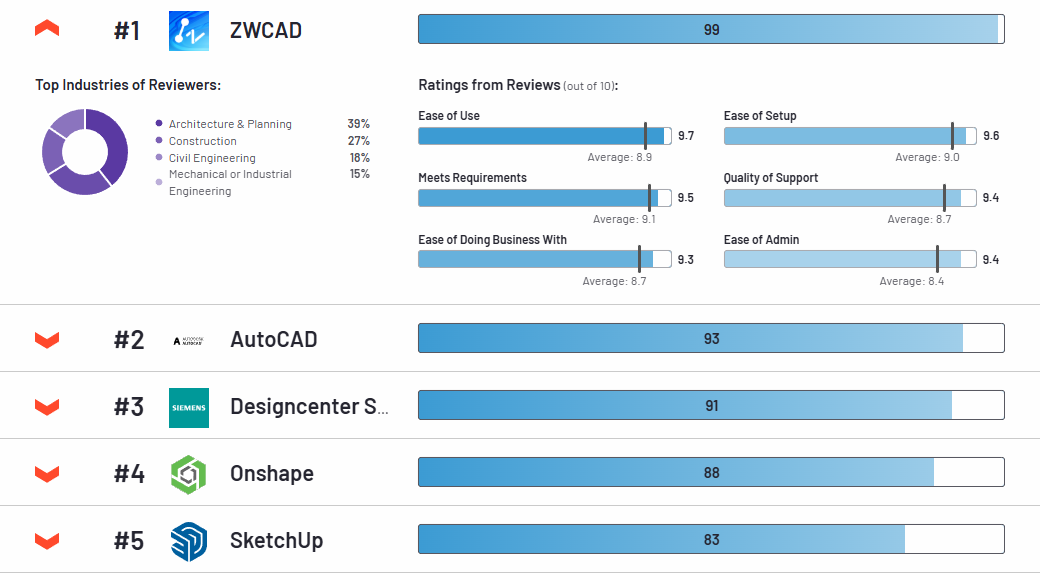
ZWSOFT CAD has been awarded two top ratings on the globally recognized software platform G2 – as "Highest Rated" and "Easiest to Use".
Since only verified users are allowed to share their experiences on G2, these awards reflect genuine trust and high user satisfaction. ZWSOFT CAD thus demonstrates its reliability, user-friendliness, and performance as a professional CAD solution..
Seamless transition, without training
Seamless compatibility with industry-standard file formatsn
ZWCAD supports seamless DWG compatibility as well as various industry-standard file formats such as IFC, DXF, and DGN. It reads, writes, and saves DWG drawings directly, ensuring the highest level of compatibility when exchanging data with AutoCAD® and other CAD solutions on the market..
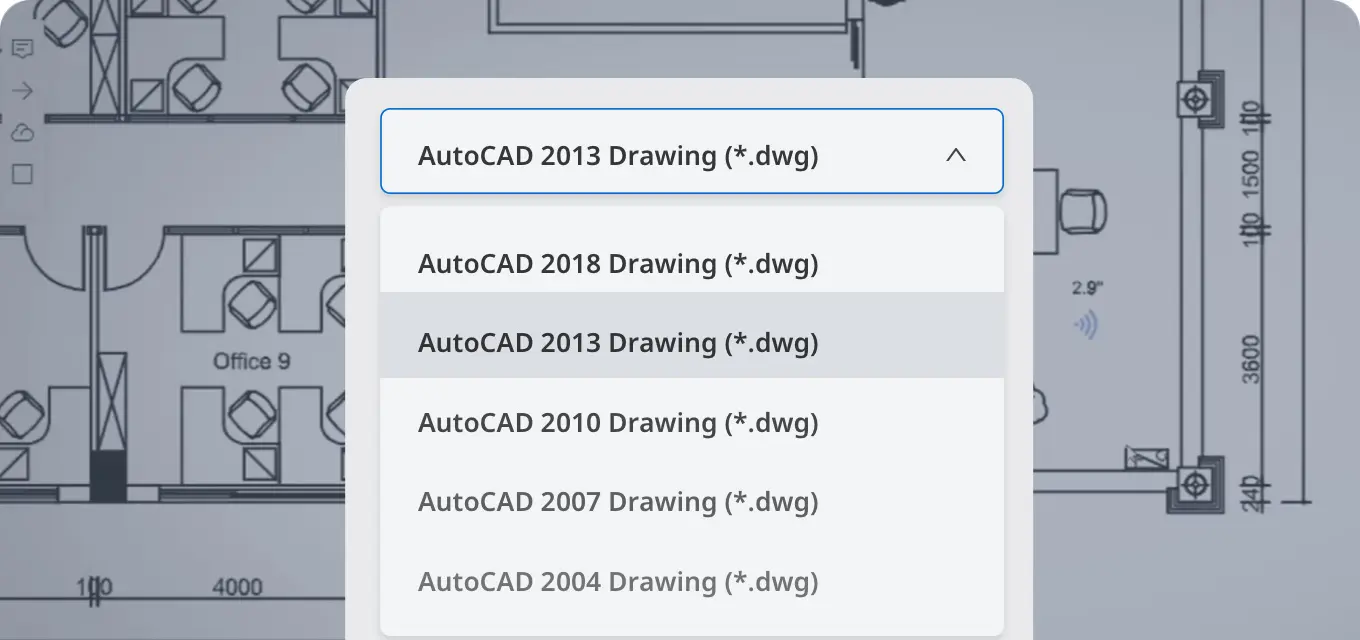
Eine vertraute Benutzeroberfläche, die eine sofortige Nutzung ermöglicht.
The familiar user interface and commands allow users of common CAD solutions to start creating immediately, as all essential commands and configurations can be found in their usual places.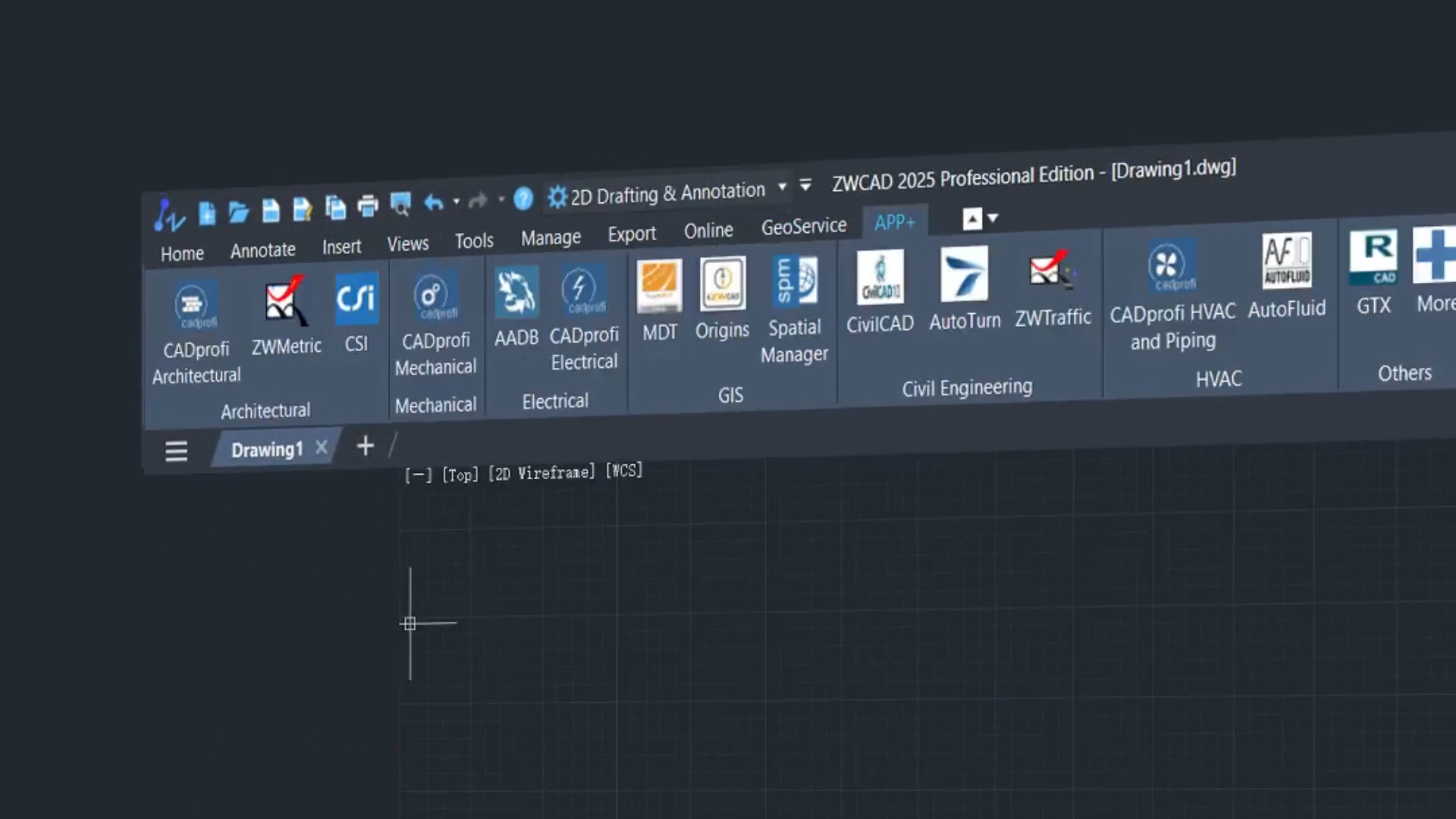
Upgrades
Mit dem jährlichen Wartungsprogramm von ZWCAD erhalten Sie unbegrenzten Zugang zu branchenführendem technischen Support sowie zu den neuesten Hauptversionsupdates zu einem unschlagbaren Preis - beginnend bei nur 180 $/Jahr für ZWCAD Standard und 280 $/Jahr für ZWCAD Professional.
Licensing policy
Mit ZWCAD erwerben Sie günstige Dauerlizenzen, keine Subscription. Neben Einzelplatzlizenzen sind auch Netzwerklizenzen erhältlich, mit denen besonders kostengünstig im Team gearbeitet werden kann. Mit dem Kauf erhalten Sie 1 Jahr Maintenance, im Rahmen derer Sie Bugfixes und Upgrades innerhalb der gekauften Version bekommen. Diese Maintenance läßt sich nach dem Jahr zum günstigen Preis von etwa 30% des
Software Preises für ein weiteres Jahr verlängern. Daneben gibt es auch reine Updates. Wenn Sie mehr als 3 Jahre nicht ugedated haben erhalten sie das Update für 45% des Neupreises.
System requirements
| Geringe Systemanforderung | |
| Operating system |
|
| Processor | Intel® Pentium™ 4 1.5 GHz or equivalent AMD® processor |
| RAM | 1 GB |
| Display card | 128 M |
| Hard disk | 2 GB free space in OS disk, 1 GB free space in installation disk |
| Resolution | 1024*768 VGA with True Color |
| Pointing device | Mouse, trackball, or other devices |
| Recommended System Requirements | |
| Operating system |
|
| Processor | Intel® Core™2 Duo or AMD® Athlon™ X2 CPU or higher |
| RAM | 2 GB or more |
| Display card | 1 GB or more |
| Hard disk | 4 GB free space in OS disk, 2 GB free space in installation disk |
| Resolution | 1440*900 with NVidia 8 series or Radeon HD series or higher |
| Pointing device | Mouse, trackball, or other devices |
Perpetual Lizenz, keine Zwangs Abonnements
ZWSOFT zwingt Sie nicht in ein nerviges Abomodell, in welchem Sie Jahr für Jahr zur Kasse gebeten werden.