

ZW3D – CAD, CAE und CAM in einer Plattform
Unify Design, Simulation, and Manufacturing to Improve Productivity
Was ist ZW3D?
ZW3D ist die perfekte Alternative für alle, die sich nach einer flexiblen, leistungsstarken und bezahlbaren 3D CAD/CAE/CAM-Lösung sehnen.
Die Software überzeugt durch eine moderne, intuitive Benutzeroberfläche und eine extrem hohe Kompatibilität zu gängigen CAD-Formaten.
Mit 17 vollständig integrierten 2D/3D-Schnittstellen kann ZW3D Daten mit nahezu allen CAD-Systemen auf dem Markt austauschen. Auch ist ein Wechsel auf ZW3D nahezu ohne jeden Lernaufwand möglich.
Dank seiner integrierten All-in-One-Architektur vereint ZW3D Konstruktion, Simulation und Fertigung in einem einzigen System – schnell, präzise und zuverlässig.
Hinzu kommt ein ausgezeichnetes Preis Leistungs Verhältnis.
Das gibt Ihnen finanzielle Planungssicherheit und die Freiheit, Ihre Projekte langfristig mit einer Software zu realisieren, die wirklich Ihnen gehört.
ZW3D ist die ideale CAD/CAE/CAM-Lösung
Agiles 3D-CAD für Profis
ZW3D ist eine leicht zu erlernende all in one 3D CAD/CAE/CAM Lösung und bietet vielfältige Funktionen für Produktentwicklung, Maschinenbau und Anlagenplanung. Jetzt ist der beste Zeitpunkt zum Kauf, da wir die Features der Version 2026 nochmals verbessert haben.
Feature Vergleich mit SolidWorks®
Module | ZW3D SolidWorks® |
| Solid Modeling | ✔️ ✔️ |
Surface Modeling | ✔️ ✔️ |
Assembly | ✔️ ✔️ |
2D Drawing | ✔️ ✔️ |
Direct Edit
| ✔️ ✔️ |
PMI
| ✔️ ✔️ |
Animation | ✔️ ✔️ |
Sheet Metal | ✔️ ✔️ |
Steel Structure | ✔️ ✔️ |
Mold
| ✔️ ❌ |
Electrode
| ✔️ ❌ |
Harness
| ✔️ ✔️ |
Piping
| ✔️ ✔️ |
Motion Simulation | ✔️ ✔️ |
Reverse Engineering | ✔️
✔️ |
Structural Simulation | ✔️ ✔️ |
EM Simulation | ✔️ ❌ |
Motor Simulation | ✔️ ❌ |
CAM | ✔️ ✔️ |
· Drilling | ✔️ ✔️ |
· 2 Axis | ✔️ ✔️ |
· 3 Axis | ✔️ ✔️ |
· 5 Axis | ✔️ ❌ |
· Turning | ✔️ ✔️ |
Cost Analysis | ❌ ✔️ |
Collaboration | ✔️ ✔️ |
Import File Formats | ZW3D SolidWorks® |
| DWG/DXF (*.dwg, *.dxf) | ✔️ ✔️ |
IGES/STEP/STL(*.igs, *.iges/*.stp, *.step/*.stl) | ✔️ ✔️ |
Parasolid(*.x_t, *.x_b, *.xmt_txt, *.xmt_bin) | ✔️ ✔️ |
3DXML (*.3dxml ) | ✔️ ❌ |
VDA (*.vda) | ✔️ ✔️ |
VRML (*.wrl) | ✔️ ✔️ |
ACIS (*.sat, *.sab, *asat, *asab) | ✔️ ✔️ |
Catia V4/V5(*.cat, *.model, *.exp, *.CATPart, *.CATProduct,) | ✔️ ❌ |
Catia drawing(*.CATDrawing) | ✔️ ❌ |
Inventor (*.ipt, *.iam ) | ✔️ ✔️ |
NX (*.prt) | ✔️ ✔️ |
Creo (*.prt, *.prt.*, *.asm, *.asm*) | ✔️ ✔️ |
SolidEdge (*.par, *.asm.*, *.psm) | ✔️ ✔️ |
SolidWorks (*.sldprt, *.sldasm, *.slddrw) | ✔️ ✔️ |
SolidWorks drawing(*.slddrw) | ✔️
✔️ |
JT (*.jt) | ✔️ ✔️ |
IFC (*.IFC) | ❌ ✔️ |
STL (*.stl) | ✔️ ✔️ |
OBJ (*.obj) | ✔️ ✔️ |
Export File Formats | ZW3D SolidWorks® |
| DWG/DXF (*.dwg, *.dxf) | ✔️ ✔️ |
IGES/STEP/STL(*.igs, *.iges/*.stp, *.step/*.stl) | ✔️ ✔️ |
Parasolid(*.x_t, *.x_b, *.xmt_txt, *.xmt_bin) | ✔️ ✔️ |
3DXML (*.3dxml ) | ✔️ ✔️ |
VDA (*.vda) | ✔️ ✔️ |
VRML (*.wrl) | ✔️ ✔️ |
ACIS (*.sat, *.sab, *asat, *asab) | ✔️ ✔️ |
Catia V4/V5(*.cat, *.model, *.exp, *.CATPart, *.CATProduct,) | ✔️ ❌ |
SolidWorks drawing(*.slddrw) | ✔️
✔️ |
JT (*.jt) | ✔️ ❌ |
IFC (*.IFC) | ✔️ ✔️ |
STL (*.stl) | ✔️ ✔️ |
OBJ (*.obj) | ✔️ ❌ |
Module | ZW3D SolidWorks® |
| Solid Modeling | ✔️ ✔️ |
Surface Modeling | ✔️ ✔️ |
Assembly | ✔️ ✔️ |
2D Drawing | ✔️ ✔️ |
Direct Edit
| ✔️ ✔️ |
PMI
| ✔️ ✔️ |
Animation | ✔️ ✔️ |
Sheet Metal | ✔️ ✔️ |
Steel Structure | ✔️ ✔️ |
Mold
| ✔️ ❌ |
Electrode
| ✔️ ❌ |
Harness
| ✔️ ✔️ |
Piping
| ✔️ ✔️ |
Motion Simulation | ✔️ ✔️ |
Reverse Engineering | ✔️
✔️ |
Structural Simulation | ✔️ ✔️ |
EM Simulation | ✔️ ❌ |
Motor Simulation | ✔️ ❌ |
CAM | ✔️ ✔️ |
· Drilling | ✔️ ✔️ |
· 2 Axis | ✔️ ✔️ |
· 3 Axis | ✔️ ✔️ |
· 5 Axis | ✔️ ❌ |
· Turning | ✔️ ✔️ |
Cost Analysis | ❌ ✔️ |
Collaboration | ✔️ ✔️ |
Import File Formats | ZW3D SolidWorks® |
| DWG/DXF (*.dwg, *.dxf) | ✔️ ✔️ |
IGES/STEP/STL(*.igs, *.iges/*.stp, *.step/*.stl) | ✔️ ✔️ |
Parasolid(*.x_t, *.x_b, *.xmt_txt, *.xmt_bin) | ✔️ ✔️ |
3DXML (*.3dxml ) | ✔️ ❌ |
VDA (*.vda) | ✔️ ✔️ |
VRML (*.wrl) | ✔️ ✔️ |
ACIS (*.sat, *.sab, *asat, *asab) | ✔️ ✔️ |
Catia V4/V5(*.cat, *.model, *.exp, *.CATPart, *.CATProduct,) | ✔️ ❌ |
Catia drawing(*.CATDrawing) | ✔️ ❌ |
Inventor (*.ipt, *.iam ) | ✔️ ✔️ |
NX (*.prt) | ✔️ ✔️ |
Creo (*.prt, *.prt.*, *.asm, *.asm*) | ✔️ ✔️ |
SolidEdge (*.par, *.asm.*, *.psm) | ✔️ ✔️ |
SolidWorks (*.sldprt, *.sldasm, *.slddrw) | ✔️ ✔️ |
SolidWorks drawing(*.slddrw) | ✔️
✔️ |
JT (*.jt) | ✔️ ✔️ |
IFC (*.IFC) | ❌ ✔️ |
STL (*.stl) | ✔️ ✔️ |
OBJ (*.obj) | ✔️ ✔️ |
Export File Formats | ZW3D SolidWorks® |
| DWG/DXF (*.dwg, *.dxf) | ✔️ ✔️ |
IGES/STEP/STL(*.igs, *.iges/*.stp, *.step/*.stl) | ✔️ ✔️ |
Parasolid(*.x_t, *.x_b, *.xmt_txt, *.xmt_bin) | ✔️ ✔️ |
3DXML (*.3dxml ) | ✔️ ✔️ |
VDA (*.vda) | ✔️ ✔️ |
VRML (*.wrl) | ✔️ ✔️ |
ACIS (*.sat, *.sab, *asat, *asab) | ✔️ ✔️ |
Catia V4/V5(*.cat, *.model, *.exp, *.CATPart, *.CATProduct,) | ✔️ ❌ |
SolidWorks drawing(*.slddrw) | ✔️
✔️ |
JT (*.jt) | ✔️ ❌ |
IFC (*.IFC) | ✔️ ✔️ |
STL (*.stl) | ✔️ ✔️ |
OBJ (*.obj) | ✔️ ❌ |
Umstieg auf ZW3D, ohne Training
Formatkompatibilität
Unterstützt mehr als 25 Import-/Exportformate.Gängige Industrieformate wie IGES, Parasolid, STEP, DWG/DXF, VDA, STL sowie Dateien von CATIA, Inventor, NX, Creo, SolidWorks, SolidEdge, Creo/Preo und ACIS können konvertiert, geöffnet, gespeichert und direkt bearbeitet werden.

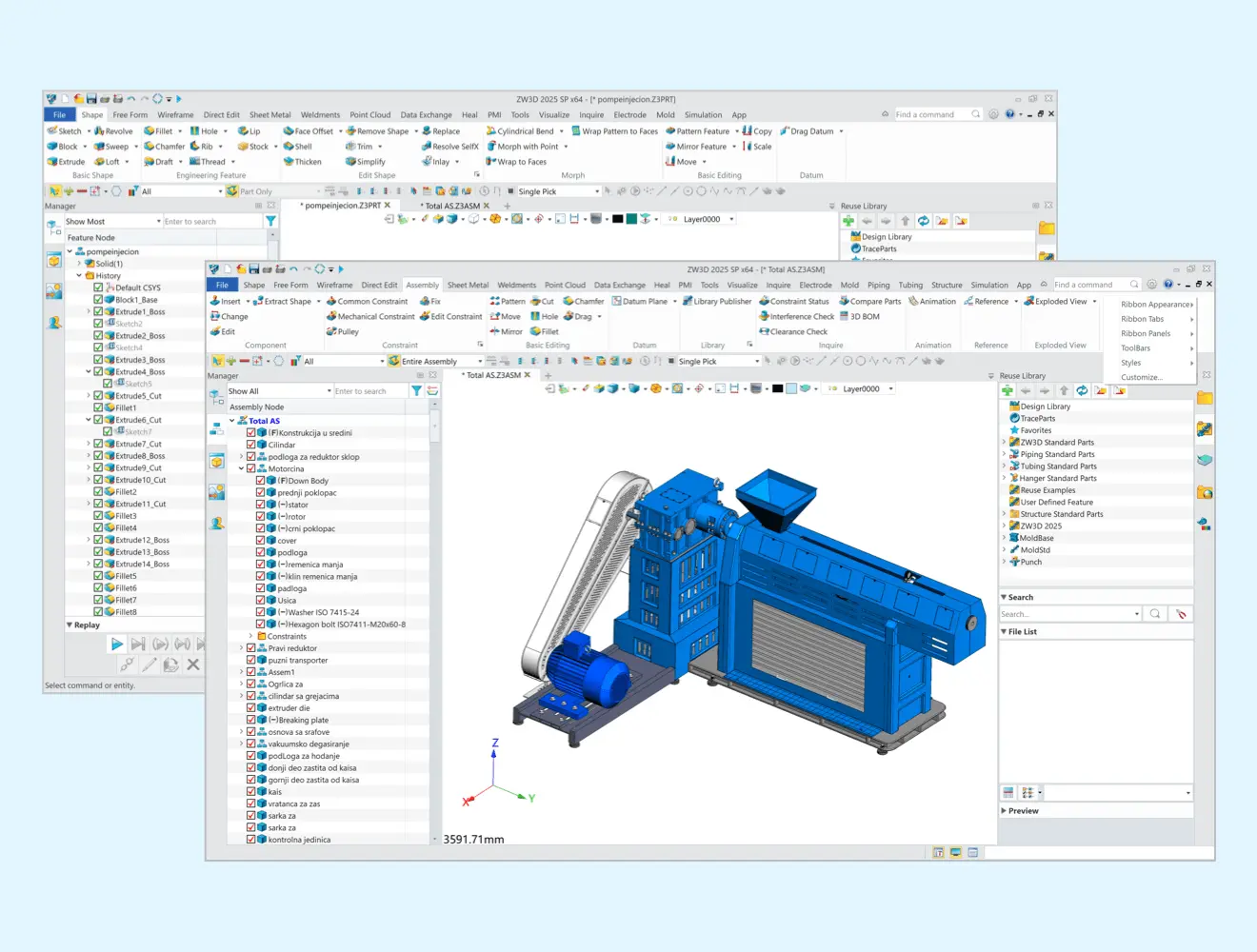
Der Wechsel zu einer neuen CAD-Lösung sollte Ihren etablierten Arbeitsablauf nicht unterbrechen. ZW3D sorgt für einen reibungslosen Übergang mit einer vertrauten Benutzeroberfläche, Werkzeugen und Funktionen, sodass Sie vom ersten Tag an produktiv bleiben.
Lizenzpolitik
Systemvoraussetzungen
| Operating system | ZW3D: Microsoft® Windows 7 SP1 Microsoft® Windows 8.1 Microsoft® Windows 10 Microsoft® Windows 11 Recommended system: Windows 10 Version 1909 or Windows 10 Version 20H2 Note: Windows 7 SP1 may not install the KB2999226, resulting in incomplete installation of the VC2015 plug-in. When Starting ZW3D, it will alter "api-ms-win-crt-runtime-l1-1-0 DLL", which can be solved by installing KB2999226 package. ZW3D Network License Manager: Microsoft® Windows Server 2008 R2 SP1 Microsoft® Windows Server 2012 Microsoft® Windows Server 2016 Microsoft® Windows 7 SP1 Microsoft® Windows 10 Microsoft® Windows 11 Note: The 32-bit Windows operation system is not supported by ZW3D since version ZW3D 2023. |
| Processor | Intel Pentium® 4 (@2GHz or above), or equivalent AMD® processor |
| GPU | Support OpenGL 3.3 and above graphics cards Note: If Simulation module is used, OpenGL 4.2 and above graphics card is required Recommended: NVIDIA GeForce GTX1050 Ti or NVIDIA GeFore GTX 1650 |
| RAM | Minimum configuration: 2G Recommended configuration:8G or Above |
| Virtual memory | Minimum configuration: 1G Recommended configuration: 2G or Above |
| GB | Minimum configuration: 4G free disc space Recommended configuration: 8G or above free disc space |
| Video | Minimum configuration: 1024 x 768 VGA with True Color Recommended configuration: 1280×1024,1680×1050,1920×1080 VGA with True Color or above |
| Pointing device | Three-button mouse, trackall or other device. |
| Required for licensing | Soft Key or Dongle |
| Required for Floating License | Installation of TCP/IP Network Protocol |
| CD-ROM | Any speed (for installation only) |
Systemvoraussetzungen
| Operating system | ZW3D: Microsoft® Windows 7 SP1 Microsoft® Windows 8.1 Microsoft® Windows 10 Microsoft® Windows 11 Recommended system: Windows 10 Version 1909 or Windows 10 Version 20H2 Note: Windows 7 SP1 may not install the KB2999226, resulting in incomplete installation of the VC2015 plug-in. When Starting ZW3D, it will alter "api-ms-win-crt-runtime-l1-1-0 DLL", which can be solved by installing KB2999226 package. ZW3D Network License Manager: Microsoft® Windows Server 2008 R2 SP1 Microsoft® Windows Server 2012 Microsoft® Windows Server 2016 Microsoft® Windows 7 SP1 Microsoft® Windows 10 Microsoft® Windows 11 Note: The 32-bit Windows operation system is not supported by ZW3D since version ZW3D 2023. |
| Processor | Intel Pentium® 4 (@2GHz or above), or equivalent AMD® processor |
| GPU | Support OpenGL 3.3 and above graphics cards Note: If Simulation module is used, OpenGL 4.2 and above graphics card is required Recommended: NVIDIA GeForce GTX1050 Ti or NVIDIA GeFore GTX 1650 |
| RAM | Minimum configuration: 2G Recommended configuration:8G or Above |
| Virtual memory | Minimum configuration: 1G Recommended configuration: 2G or Above |
| GB | Minimum configuration: 4G free disc space Recommended configuration: 8G or above free disc space |
| Video | Minimum configuration: 1024 x 768 VGA with True Color Recommended configuration: 1280×1024,1680×1050,1920×1080 VGA with True Color or above |
| Pointing device | Three-button mouse, trackall or other device. |
| Required for licensing | Soft Key or Dongle |
| Required for Floating License | Installation of TCP/IP Network Protocol |
| CD-ROM | Any speed (for installation only) |